doctree
Your documents stay in your Google Drive, not with us.
Mail merge works, until it doesn’t
Real spreadsheets contain:
combined names and addresses in one cell
optional fields that are sometimes empty
payment terms written as text
data copied from emails, CRMs, and forms
To make Word behave, most tools force you to:
split columns
add IF logic
debug templates
manually check every document
That’s not automation. That’s stress.

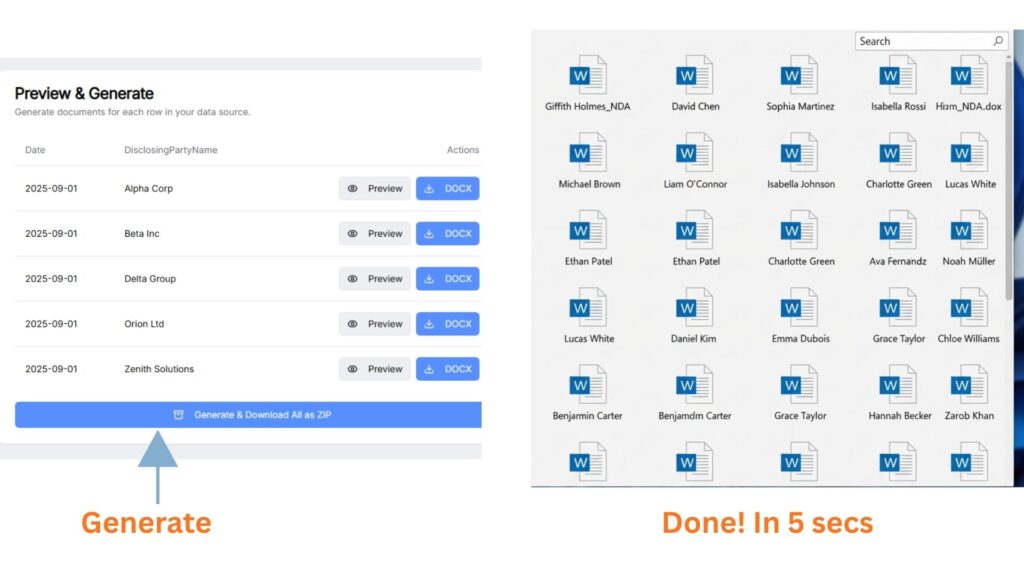
Generate those many tedious documents instantly and perfectly.
Keep data privacy intact, we don’t keep your data
Avoid embarrassments and costly mistakes
Download locally or click “Save to Drive” — nothing is stored on our servers unless you explicitly save it.
Try Your First Template
BEFORE
Tedious Manual Method taking hours
AFTER
We never save your documents. Everything stays in your Drive or your local computer.
Manual export only (to local computer and Google Drive). No auto-save. No hidden syncing.
Access to only the folder created by the app in your Google Drive. DocTree does not see beyond the app folder
Fast, compliant document workflows your team can trust.
Doctree helps you to:
✅ Avoid copy-paste errors that surface after documents are sent
✅ Avoid your data from quietly getting stored or reused your sensitive files
✅ Avoid workflows you can’t clearly explain to compliance or legal
Your files stay in your Google Drive, not our servers.
Bring your existing workflow
DocTree Is Built For Exactly That
We only access the app folder we create, never your entire Drive.
Documents are generated in memory; no intermediate, permanent or temporary storage on our servers.
Files are only written to your Google Drive or local computer when you choose to save them.
✅ Cut hours of manual editing every week instantly.🖱️ Eliminate copy-paste mistakes with automated accuracy.🔒 Keep full control of your documents. We never store them.✨Deliver consistent, professional documents every time.
NDA & contracts
Bulk onboarding docs
Juggling repeat agreements
handling contracts across multiple clients